Turning Off Open & Click Tracking for Your Entire Account
How to disable open and click tracking across your whole rezora account, rather than contact by contact.
Written By Danny Schaffer
If you want to disable email open and click tracking across your whole account rather than adjusting it contact by contact, rezora makes this possible through your account settings. This is a useful option if you want a blanket policy on tracking, whether for compliance reasons or personal preference.
Turning off tracking account-wide means you will lose visibility into open and click data for all your email campaigns, so consider whether a full account change or a more targeted, contact-by-contact approach best fits your needs.
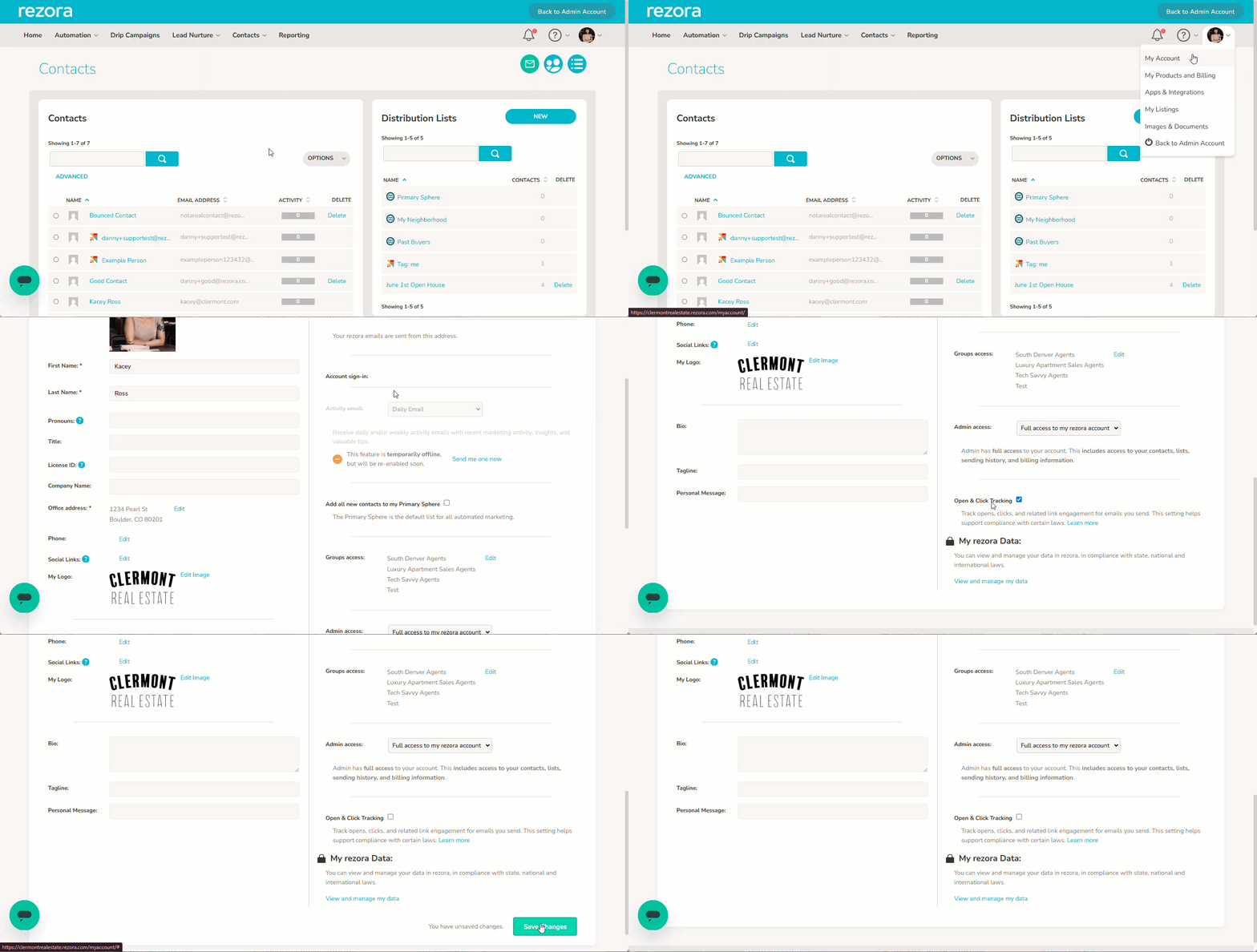
How to disable tracking account-wide in rezora:
Click on your Profile Picture in the top right corner to open the My Account page.
Scroll down until you find the "Open & Click Tracking" setting.
Uncheck the box.
Click Save Changes.
Once saved, this setting will apply across your account, so you won't need to manually adjust tracking preferences for each contact individually.
Manage on a Per Contact basis instead.
This account-level setting is separate from the per-contact tracking toggle. If you only need to disable tracking for specific individuals, such as contacts based in France or Italy for CNIL-related reasons, you can manage as shown in this article: Turning Off Open & Click Tracking for Contacts (CNIL Compliance)