Turning Off Open & Click Tracking for Contacts (CNIL Compliance)
How to disable open and click tracking for an individual contact, and what to know about CNIL compliance
Written By Danny Schaffer
Under guidance from France's data protection authority (CNIL), some recipients, particularly in France and increasingly relevant in Italy, must not have their email opens and clicks tracked without proper consent. If you use Rezora, you can disable this tracking on a per-contact basis in just a few steps.
You can also turn off Open and Click tracking for your entire account at once: Turning Off Open & Click Tracking for Your Entire Account
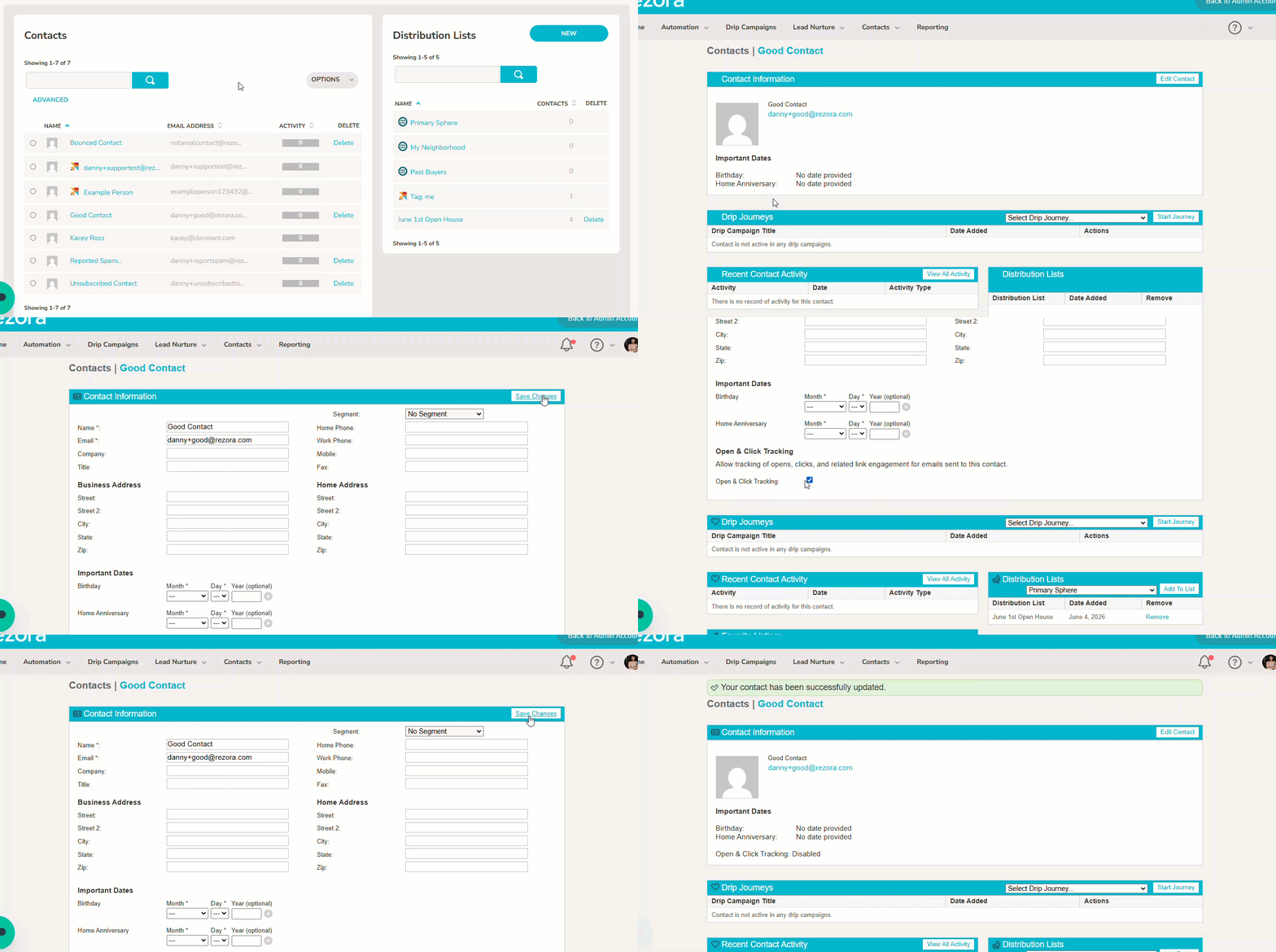
How to disable tracking in Rezora:
Go to the Contacts page.
Click the name of the contact you need to update.
Select Edit Contact in the top right corner.
Uncheck the box labeled "Open & Click Tracking."
Click Save Changes at the top of the page.
That's it! Tracking pixels and click-through logging will no longer be applied to that contact's emails.
Important limitations
This process only applies to Rezora contacts. It does not extend to:
Marketer Distribution List (MDL) contacts
CRM contacts
Tracking preferences for these contact types can't be controlled through the Rezora contact edit screen.
A note of caution: If you have MDL or CRM contacts located in France or Italy, it may be advisable to avoid emailing them until tracking can be properly managed or consent is confirmed. This helps reduce compliance risk under CNIL guidance and similar regulatory expectations in Italy.
Should You Talk to a Lawyer?
Whether you need to stop emailing MDL or CRM contacts in France or Italy, or can continue with proper consent instead, depends on specifics like how those contacts were collected and whether rezora's tracking controls satisfy your obligations for tracking done outside those lists. Since compliance requirements vary by business and jurisdiction, it's worth confirming your approach with a lawyer rather than relying on this recommendation alone.