
Changelog

Follow new updates and improvements to rezora.

New Support Experience, smoother email editing and contact imports
New Features

A more helpful in-app support experience

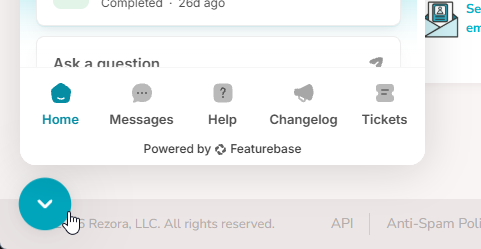
We introduced a more unified way to access support and product updates from within Rezora. You can quickly access our support articles, chat with our support team, and access current and previous chats. This gives you a clearer path to help when you need it, whether you are signed in, sharing access, or returning to the platform.

Improvements

  • Safer, clearer contact imports: Contact imports now filter unavailable lists, retain your selections, prevent duplicate emails, and provide clearer feedback when something needs attention.

  • More reliable in-app support identity: The support experience now better recognizes the active visitor and account context across administrator access.

  • Updated text editing in Zephyr Builder: Text-based content elements now use refreshed editing menus, and sent emails include lighter, cleaner HTML.

Bug Fixes

  • Email-editor saves stay intact: Resolved issues that could cause email, template, newsletter, and row edits to revert, show false errors, or lose current details.

  • Automatic email-builder session recovery: Saving changes in the Zephyr Builder now recover from expired sessions without interrupting work.

  • Distribution-list management works more smoothly: Fixed issues affecting distribution-list creation, naming, roster updates, and protected-list permissions.

  • Product-access reminders use the right timing: Annual reminders no longer send when product access is already nearing expiration.

  • Some listing feeds send duplicate automations: Resolved an issue that could send duplicate listing automation events to recipients.
Internal Sending and smoother workflows

New Features

Internal Sends to Roster Contacts

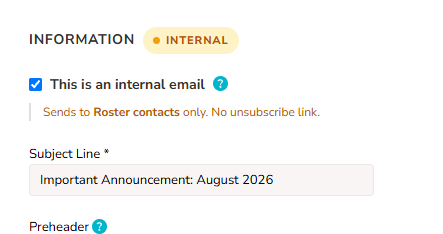
Admins can now send Internal emails to their roster contacts! These emails allow important communications and announcements to always be sent to your team, bypassing blocks associated with marketing email content. It helps you reach the right internal audience while keeping these sends organized and easy to manage.

Improvements

  • Guided first-time setup: The setup assistant now opens automatically for new agents, making it easier to get started.

  • Faster property updates: Property information from MLS integrations now refreshes more frequently.

Bug Fixes

  • More reliable account signup: Fixed account-creation issues that could occur when roster matching or legacy account settings were involved.

  • Fixed recipient counts: Fixed cases where deleted contacts could still be included in the recipient count for a started or scheduled marketing piece.

  • Better integration contact handling: Improved contact creation and connection handling for integrated services.

  • Flexible template archiving: Templates can now be archived when they are only connected to archived campaigns.

  • Correct lead-nurture enrollment: Opt-in choices and activity history now stay in sync.

  • Reliable profile image updates: Admins can now replace agent profile images successfully.

Better email tracking controls, smoother Canva workflows, and cleaner sharing updates

New Features

Shared Canva designs are easier to access

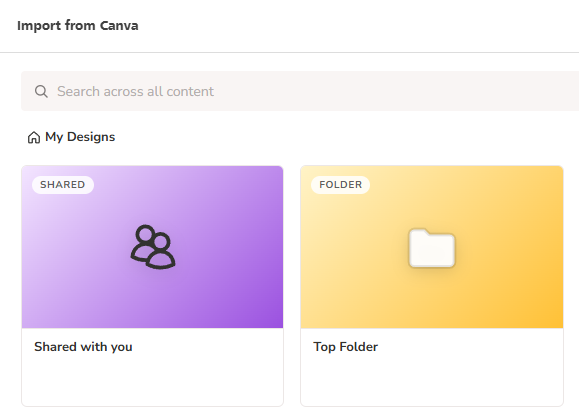
We added a new “Shared with you” area in the Canva design picker. Users can now find shared Canva designs more quickly without hunting through other folders. This makes it easier to bring the right design into an email or template with less friction.

More flexible email tracking controls

We added a new set of open and click tracking controls across the platform. Admins and Agents can now manage tracking more precisely, and contacts can manage their own tracking preference from the unsubscribe flow. This gives teams clearer control over tracking behavior and helps them stay in compliance with some laws that require tracking to be opt-in only.

Home page notifications for shared marketing pieces

We added home page notifications for marketing pieces that have been shared but not yet accepted. This helps shared content move through the workflow more smoothly.

Improvements

  • Faster Canva design browsing: We improved the Canva design panel so designs load more smoothly and large libraries are faster to browse.

  • More reliable open house timing data: We updated open house data handling so imported time information is more accurate and easier to trust.

Bug Fixes

  • Canva sign-in and import flow fixes: We fixed issues that could interrupt the Canva connection flow or cause users to lose context while importing designs.

  • Smart Check compatibility with Canva content: We fixed problems that caused content checks to fail or skip validations when Canva content was included.

  • Shared marketing piece reliability fixes: We fixed issues that could create duplicate share records and improved how accepted shares are recorded.

  • Brokerage selection and account setup fixes: We fixed several issues where account creation could fail as a result of brokerage information being lost along the way.

  • Contact naming fallback fix: We fixed an issue so imported CRM contacts fall back to using an email address when a name is missing.

Earlier updates