What is an “unsubscribed contact”?
What it means when a contact unsubscribes, and how to view or export your unsubscribed contacts list
Written By Danny Schaffer
If a contact unsubscribes from you, it means that they no longer wish to receive your marketing pieces. As soon as they complete the “unsubscribe” option, they will remain on your contact list, but rezora will no longer send marketing pieces to that address -- even if they are marked as a recipient.
A contact can be marked as unsubscribed if:
They used the "opt-out of future sends" link at the bottom of an email you sent them and unsubscribed from you or your company as a whole.
They used the "opt-out of future sends" link for someone else in your company system and selected the "unsubscribe from company" option.
They are a contact that was imported from a CRM connection to rezora, but in the CRM, they are marked as unsubscribed or as not having permission for you to send to them.
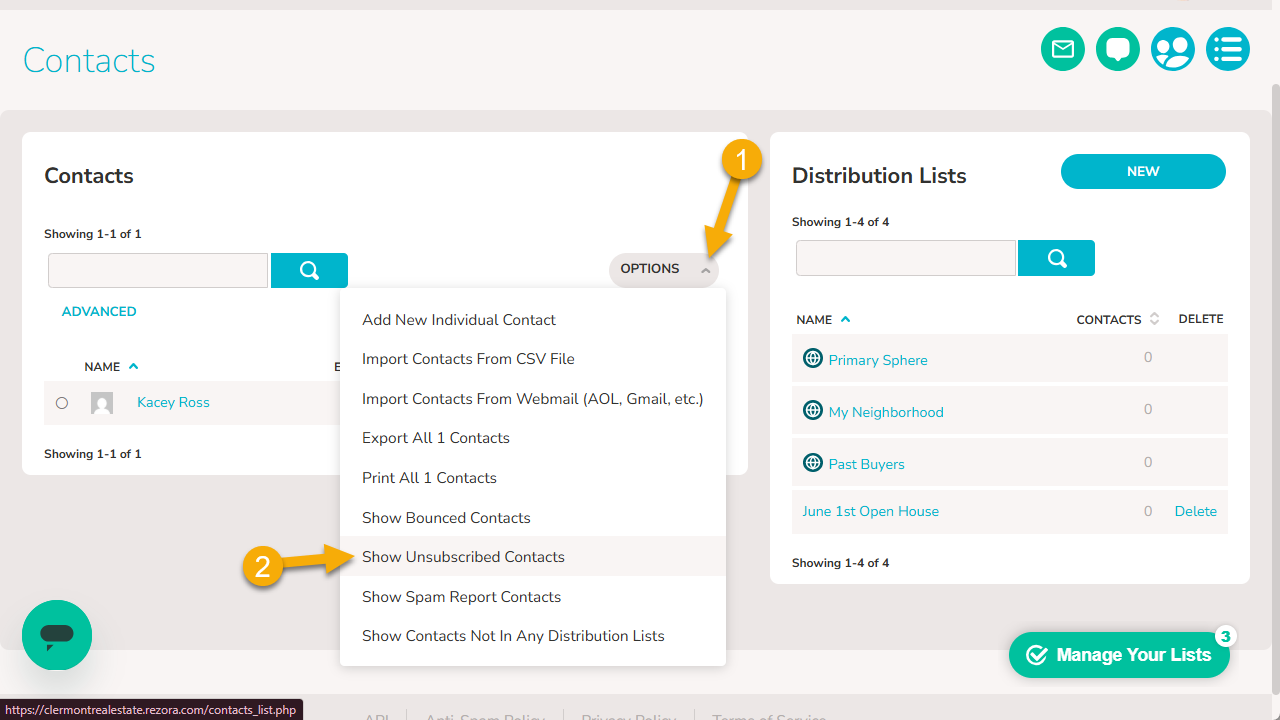
How do I view my unsubscribed contacts?
Head to your Contacts page.
Click the "Options" button in your contact box
Scroll down and click on “Show Unsubscribed Contacts”.
To export the list:
Click again on the "Options" button.
Click "Export Current XXX Contacts". This will download a CSV file to your desktop.
Optional: Though not required, if you choose, you can delete all unsubscribed contacts from your account. After showing your unsubscribed contacts, you can click on "Options" again and choose 'Delete Current [current # of contacts] Contacts'.