How do I create an agent account as an admin?
How an admin creates a new agent account, and how to troubleshoot common account-creation errors.
Written By Danny Schaffer
Log in as the Company Admin.
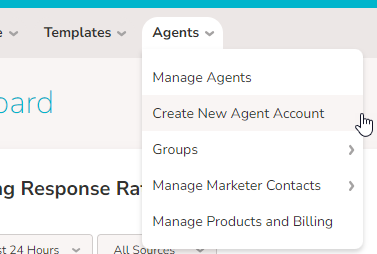
Hover over Agents and select Create New Agent Account.
This next part of the process will be done as if you are the agent.
Enter the Agent's First Name, Last Name, and Email Address
Click Continue.
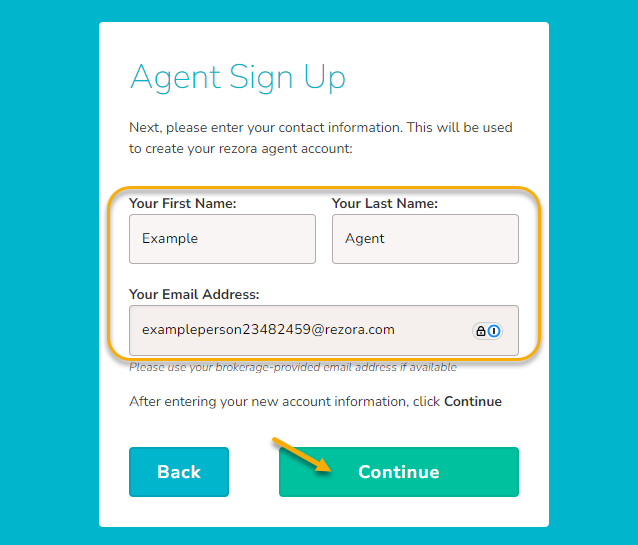
When you click Continue, the account will be created! If you wait a moment, your page should route back to the admin account. Check the "Troubleshooting" section below if an error displays.
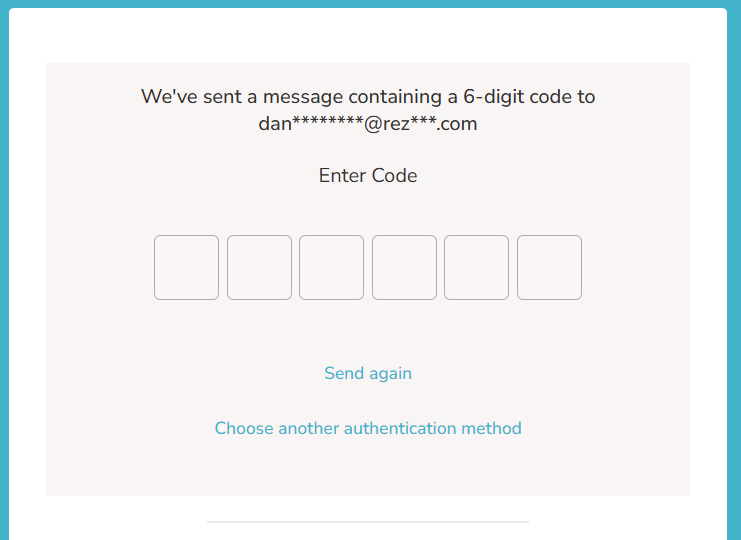
The agent will receive an email that their account has been created. They'll sign in with the Email Address you input in the process. When they go to sign in, they'll receive a one-time password for verification and sign in to the account at that time!
Troubleshooting
There are a few potential errors that could prevent the account from being created. We'll go through a few of them here:
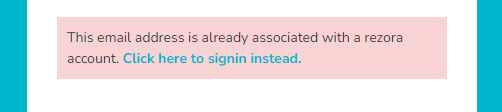
The email address is already associated with a rezora account. - The email address entered for this account is already in use somewhere else. That could mean for a currently active rezora account, or potentially an account that was deactivated in the past. Feel free to reach out to support@rezora.com with any questions.
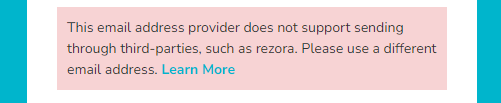
The email address provider does not support sending through third-parties, such as rezora. Please use a different email address. - You'll see this message if you've attempted to enter a "free" email address like Gmail, Yahoo, Aol, etc. These services have settings in place to actively prevent sends from outside services like rezora, so we don't allow their use. We recommend using a custom domain or company domain that can be configured for rezora sending - Learn more here
The email address entered is not a valid format. - Something accidental may have slipped in here. Check the entered email address for typos, a missing @ (or too many @'s), and that the entered domain is valid (rezora vs rezora.com)

Not sure what is happening? Feel free to reach out to us at support@rezora.com with the email address you entered and a screenshot if you can grab one. We'd be happy to take a closer look!